BuildYourCNC
ESS - Ethernet Smooth Stepper Board
ESS - Ethernet Smooth Stepper Board
Couldn't load pickup availability
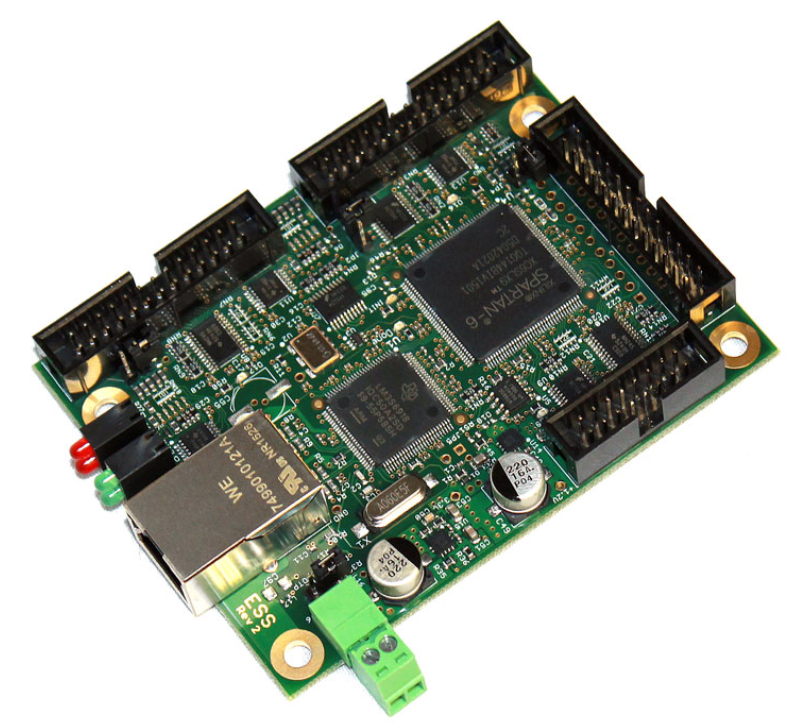
Ethernet SmoothStepper ESS Controller for Mach3 & Mach4
Upgrade from old parallel-port control to a dedicated Ethernet motion controller built for Mach3 and Mach4 CNC systems. The ESS handles motion control in dedicated hardware, then sends clean step-and-direction signals to your breakout board, motor drivers, relays, switches, and other CNC electronics.
Who should buy the ESS?
The Ethernet SmoothStepper is not the cheapest controller and it is not trying to be an all-in-one screw-terminal board. It is for builders who want a proven Ethernet motion-control architecture with breakout-board flexibility.
Mach3 or Mach4 users
Use the ESS when you want controller hardware that works with both Mach3 and Mach4 through the SmoothStepper plugin.
Ethernet-control builds
Ethernet gives you a cleaner modern control setup without depending on a legacy parallel-port computer.
Breakout-board systems
Best when you plan to pair the ESS with a breakout board such as the C25XP or other compatible CNC interface hardware.
What the ESS does
Mach3 or Mach4 plans the toolpath. The ESS receives motion commands from Mach and generates the step-and-direction pulse signals used by your motor drivers.
- Controls up to 6 CNC axes
- Generates high-quality pulse trains with very low jitter
- Uses Ethernet instead of a parallel port
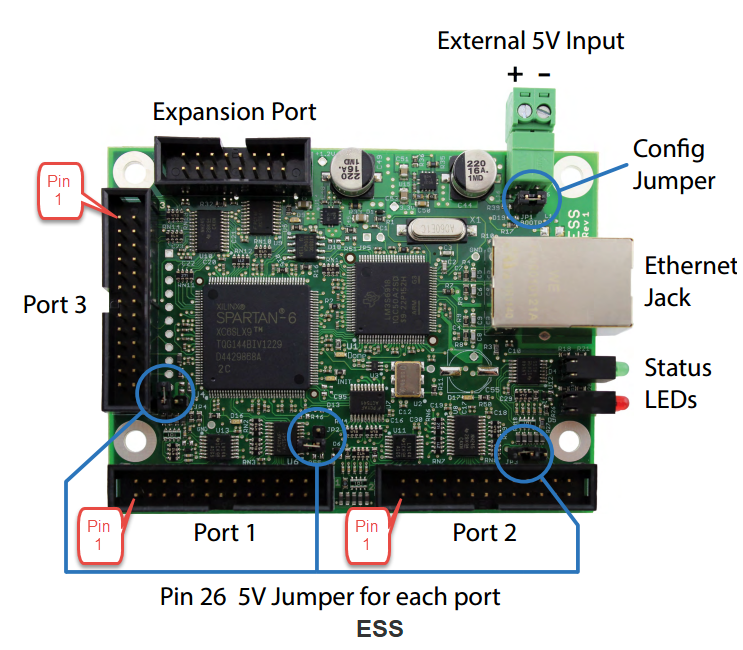
- Provides three parallel-port-style 26-pin headers
- Works with stepper and compatible digital servo motor drivers
What it does not do
The ESS is a motion controller, not a complete CNC control box.
- It does not directly power motors
- It does not replace stepper or servo drivers
- It usually needs a breakout board or interface board
- It needs a regulated 5V power supply
- It does not directly drive analog or PWM servo drives
Recommended setup: Pair the ESS with the C25XP Professional Wiring Add-On if you want screw terminals, integrated spindle-control features, safety monitoring, status LEDs, and cleaner panel wiring.
Want the easier complete setup?
The ESS is the motion controller, but most CNC builds also need a clean way to connect machine wiring. The ESS + C25XP bundle pairs this Ethernet SmoothStepper with the C25XP breakout board so you get Ethernet motion control plus screw-terminal wiring, relays, spindle-control features, safety monitoring, and status LEDs in one matched setup.
Recommended add-on: DIN Rail Support for Ethernet SmoothStepper ESS
If you are mounting the ESS inside a CNC control cabinet or electrical enclosure, add the DIN rail support. It helps mount the Ethernet SmoothStepper neatly on DIN rail so the control box looks cleaner, stays more organized, and is easier to service later.
This is a mechanical mounting accessory only. It does not add electrical features, screw terminals, relays, inputs, outputs, spindle control, or safety monitoring.
View DIN Rail SupportKey ESS specifications
Motion and software
- SoftwareMach3 / Mach4
- ConnectionEthernet
- Axis supportUp to 6 axes
- Pulse capabilityUp to 4 MHz
- Signal modesStep/Dir, Quadrature, CW/CCW
I/O and wiring
- Total I/O51 pins
- Dedicated outputs20 pins
- Dedicated inputs15 pins
- Bidirectional I/O16 pins
- Connector style3 × 26-pin headers
Official ESS setup resources, downloads, and plasma control files
Use these official Warp9 and BuildYourCNC support resources to set up the Ethernet SmoothStepper ESS, download the required plugin and configuration software, review plasma control box wiring information, and access a ready XML configuration file for compatible C332S, C62, and ESS setups.
These resources are provided to help with ESS installation, Mach3/Mach4 configuration, plasma control box setup, and compatible CNC controller wiring. Always verify that the selected XML, plugin, software version, and wiring match your exact machine, breakout board, drives, plasma system, and control cabinet layout before powering the system.
ESS vs other controller options
Use this comparison to choose the right controller architecture, not just the longest feature list.
| Use case | Ethernet SmoothStepper ESS | Mach3 USB Board | PoKeys57CNC |
|---|---|---|---|
| Best buyer | Builder who wants Ethernet control with breakout-board flexibility | Budget-focused Mach3 user with a simple machine | Builder who wants the most built-in CNC features and expansion |
| Software | Mach3 / Mach4 | Mach3 | Mach3 / Mach4 |
| Connection | Ethernet | USB | USB / Ethernet |
| Why choose it? | Proven Ethernet motion control and parallel-port-style compatibility | Lowest-cost simple Mach3 path | Most expandable all-around controller |
Build it three ways
ESS only
Choose the ESS alone if you already have a compatible breakout board, wiring plan, power supply, and control cabinet layout.
Current productESS + C25XP bundle
Best choice for most buyers building a Mach3 or Mach4 control box because it includes the motion controller and the professional wiring interface.
View ESS + C25XP bundleAdd DIN rail support
Add this if you are mounting the ESS inside a DIN rail-based CNC control cabinet or electrical enclosure.
View DIN rail supportCommon applications
- CNC routers
- Mills and lathes
- Plasma tables
- Laser tables
- Waterjet systems
- Drag knives and pipe benders
- Mach3 or Mach4 retrofit control boxes
What to buy with it
- Regulated 5V power supply for the ESS
- Ethernet cable
- Breakout board or C25XP wiring add-on
- Stepper or compatible digital servo drivers
- Power supply for motor drivers
- Limit switches, E-stop, relays, and wiring as needed
- DIN rail support if mounting the ESS inside a control cabinet
Professional Ethernet motion control for Mach3 and Mach4
Choose the ESS if you want a proven Ethernet controller, breakout-board flexibility, 6-axis capability, and 51 I/O pins for serious CNC control boxes. For the cleanest setup, pair it with the C25XP or choose the ESS + C25XP bundle.
Share