BuildYourCNC
C36S Quad Relay Board for CNC Accessory Control
C36S Quad Relay Board for CNC Accessory Control
Couldn't load pickup availability
C36S Quad Relay Board
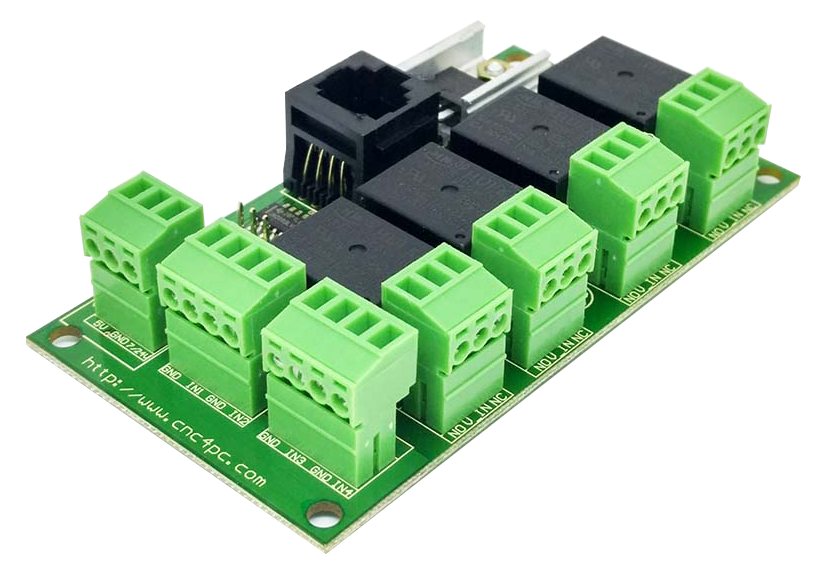
The C36S Quad Relay Board gives your CNC control system four independent relay outputs for switching machine accessories on and off. It is designed for CNC builders who need to control multiple external devices such as spindle enable circuits, coolant pumps, vacuum systems, dust collectors, solenoid valves, warning lights, or other auxiliary equipment.
Each relay includes Normally Open (NO) and Normally Closed (NC) connections, giving you flexible wiring options depending on how your accessory needs to operate. The board also includes RJ45 input connectors, screw terminals, relay status LEDs, and DIN rail mounting for a cleaner control box installation.
Why Choose the C36S?
- Control up to 4 devices: Provides four electromechanical relays for switching multiple CNC accessories from your controller.
- NO and NC relay contacts: Each relay includes Normally Open and Normally Closed positions for flexible wiring.
- RJ45 input connectors: Allows cleaner input wiring using standard network-style cables with compatible CNC control boards.
- Screw terminal outputs: Makes accessory wiring easier, cleaner, and more serviceable.
- Status LEDs on each relay: Lets you quickly see which relay is active, making setup and troubleshooting much easier.
- TTL signal compatibility: Designed to work with common +5VDC or +3.3VDC TTL control signals.
- DIN rail mountable: Helps create a cleaner and more professional CNC control box layout.
- Great control box add-on: Useful when your machine needs more switched outputs than your main controller or breakout board provides.
Main Features
- 4 electromechanical relay outputs
- Normally Open (NO) and Normally Closed (NC) connections on each relay
- RJ45 input connectors for cleaner wiring with compatible boards
- Screw-on terminal connections for relay outputs
- Status LEDs on relay connections
- Compatible with TTL +5VDC or +3.3VDC control signals
- Interfaces with parallel-port style products and compatible CNC4PC boards
- DIN rail mountable design
- Designed for CNC control boxes and automation projects
Common Devices It Can Control
- Spindle enable or spindle start/stop circuit
- Coolant pump
- Mist coolant system
- Vacuum table or vacuum pump trigger
- Dust collection relay trigger
- Solenoid or electro valve
- Warning light or stack light
- Air assist or auxiliary machine output
- External contactor control
Relay Contact Options
| Connection | What It Means |
|---|---|
| Normally Open (NO) | The circuit is normally off and turns on when the relay activates. |
| Normally Closed (NC) | The circuit is normally on and turns off when the relay activates. |
Customer-Friendly Explanation
The C36S acts like four remote-controlled switches for your CNC machine. Your controller sends low-voltage signals to the board, and the relays switch external devices on or off. This is useful because CNC controllers usually should not power accessories directly.
Use this board when your CNC machine needs several controlled outputs, such as spindle on/off, coolant, vacuum, dust collection, and air valves. Instead of adding multiple single relay boards, the C36S gives you four relay channels in one cleaner board.
Common Uses
- Adding multiple relay outputs to a CNC control box
- Spindle start/stop or enable wiring
- Coolant and mist control
- Vacuum table control
- Dust collector trigger circuit
- Solenoid valve control
- External contactor control
- General CNC accessory switching
Official Documentation & Wiring Downloads
Review the official C36S documentation before wiring this quad relay board into your CNC control box. These resources help with relay output wiring, MASSO G3 integration, RJ45 input connections, accessory switching, and control cabinet planning.
Documentation may include relay wiring, MASSO G3 wiring examples, RJ45 signal information, output connection guidance, and control box installation notes. Always confirm your controller pinout, accessory voltage, current draw, relay rating, and wiring plan before powering the system.
Compatibility Notes
- This board provides relay switching only. It is not a motion controller or motor driver.
- Designed for compatible TTL +5VDC or +3.3VDC control signals.
- RJ45 input wiring requires compatible pinout and signal support from your controller or breakout board.
- Confirm your accessory voltage, current draw, and wiring requirements before connecting loads.
- For larger motors, pumps, or high-current devices, use the relay to control a properly rated contactor or external relay.
- Electrical wiring should be performed by someone qualified to work with the voltages involved.
C36S Relay Board Buying Guidance
Choose the C36S if your CNC control system needs multiple relay-controlled outputs in one compact board. It is a strong fit for MASSO G3 control boxes, CNC4PC-compatible wiring setups, and CNC machines that need controlled switching for spindle enable, coolant, vacuum, dust collection, air assist, solenoids, or warning lights.
The C36S is not a motor driver, motion controller, or power supply. It is a relay interface board. Your CNC controller provides the low-voltage control signal, and the C36S relays switch the external accessory circuit. For high-current devices, use the C36S relay to trigger a properly rated contactor or external relay instead of switching the load directly.
If you are not sure whether the C36S is the right relay board for your CNC control box, contact us before ordering. We can help you check your control signal, relay needs, wiring style, and accessory load requirements.
Share